
Zapier Pricing Breakdown: Is It Still Worth It in 2026?
Zapier pricing starts free at 100 tasks/mo; paid plans start at $29.99/mo ($19.99/mo billed yearly) and scale with task volume.

May 16, 202512 min read
Zapier pricing runs from a free plan capped at 100 tasks a month to paid tiers that start at $29.99 a month billed monthly (or $19.99 a month billed yearly) and climb steeply as task volume grows, plus a custom-priced Enterprise tier. Whether that's a fair deal depends almost entirely on how many multi-step Zaps you run each month, since every action inside a Zap consumes a task and pricing scales with volume rather than a flat per-user fee.
This guide breaks down every Zapier plan for 2026, explains why costs escalate fast for power users, and points to cheaper or unlimited-task alternatives if Zapier's task-based model doesn't fit your budget.
Ready for automation without task limits or pricing surprises? Try Activepieces now!
TL;DR
- Zapier pricing starts free with 100 tasks per month, but limits you to two-step Zaps.
- The Professional plan starts at $29.99 a month billed monthly, or $19.99 a month billed yearly, for 750 tasks — and costs rise fast as usage grows.
- The Team plan starts at $103.50 a month billed monthly, or $69 a month billed yearly, for 2,000 tasks.
- The Enterprise plan has custom pricing.
- Zapier's task-based pricing now also covers AI steps, code, and SDK calls, so AI-heavy Zaps burn through tasks faster (as of September 2026).
- Activepieces removes task limits and offers more predictable automation costs.
If you are running this arithmetic for your own team, see what the same workload costs on Activepieces.
Zapier Pricing Plans at a Glance (2026)
For a quick comparison, here's how Zapier's core plans stack up, based on pricing checked on zapier.com as of September 2026:
| Plan | Billed Monthly | Billed Yearly | Task Limit | Best For |
|---|---|---|---|---|
| Free | $0 | $0 | 100 tasks/mo | Trying automation with simple two-step Zaps |
| Professional | $29.99/mo | $19.99/mo | 750 tasks/mo (scales up) | Individuals needing multi-step Zaps and premium apps |
| Team | $103.50/mo | $69/mo | 2,000 tasks/mo | Teams of up to 25 collaborating on shared Zaps |
| Enterprise | Custom pricing | Custom pricing | Custom/annual task limits | Large organizations with advanced security needs |
Task limits shown are the starting tier for each plan — adding more tasks increases the price within the same tier, which is why costs climb quickly for high-volume users.
What Is the Pricing Strategy of Zapier?
Zapier offers a tiered pricing structure to serve a wide range of users, from individuals with simple workflow automation needs to large enterprises with complex workflows.
As of 2026, the primary Zapier pricing tiers include:
Free Plan
Free forever, but you get only 100 tasks per month (1 task = 1 action carried out by any tool connected). You can't have more than two-step Zaps, which have one trigger and one action, so you can connect two apps and automatically transfer data from one to the other.
And no matter what plan you have, you can create as many Zaps as your monthly task limit allows. To customize your Zaps, you can use Zapier Copilot and generate code steps, map data fields, and troubleshoot them when there's an error.
Admin controls further let you add an extra security layer to your Zapier account by requiring two-factor authentication.
Professional Plan
The Professional plan is for individuals who require more tasks.
With it, you can:
- Create Zaps that do as many actions from a single trigger
- Add conditional logic, data formatting, and trigger scheduling to your Zaps
- Use premium apps that are exclusively available to users on paid plans
- Build custom data integrations that can link any app with Webhooks
- Reach out to the technical support team via email or live chat (available on 2,000+ tasks)
- Connect your OpenAI account and enrich Zapier table records
It starts at $29.99 a month billed monthly, or $19.99 a month billed yearly, for 750 tasks a month. The more tasks you want, the more charges you will incur.
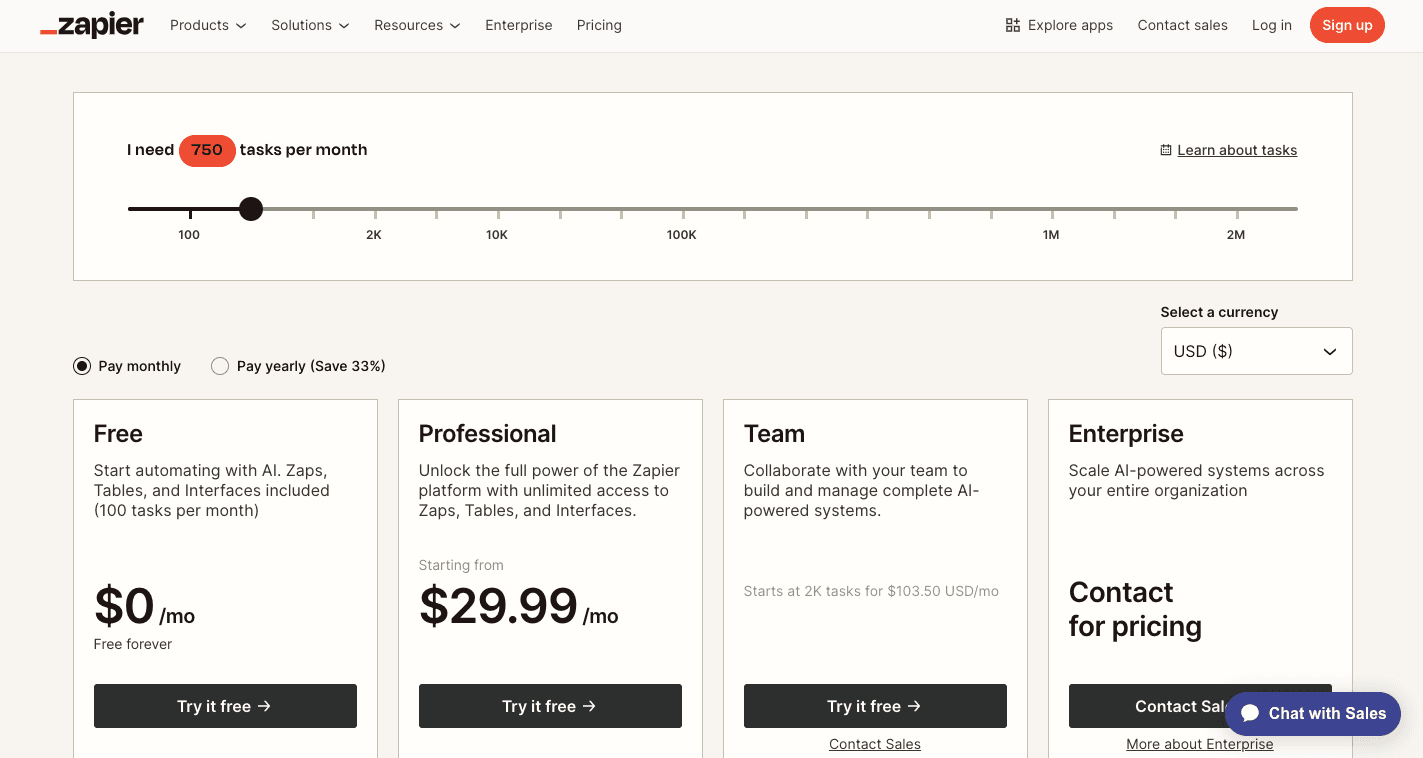
See how significantly the Zapier pricing jumps when you increase your number of tasks to just 1,500 on the Professional plan.

Team Plan
The Team plan starts at $103.50 a month billed monthly, or $69 a month billed yearly, and you're only allowed 2K tasks per month. Typically, large organizations that need to collectively manage and build automation workflows get it.
You get everything in Professional, plus:
- 25 users who can create and manage automated workflows
- Shared access to your Zaps and customized permissions
- Audit logs for six months
- SAML single sign-on (SSO) for secure access
- Prioritized responses from customer support
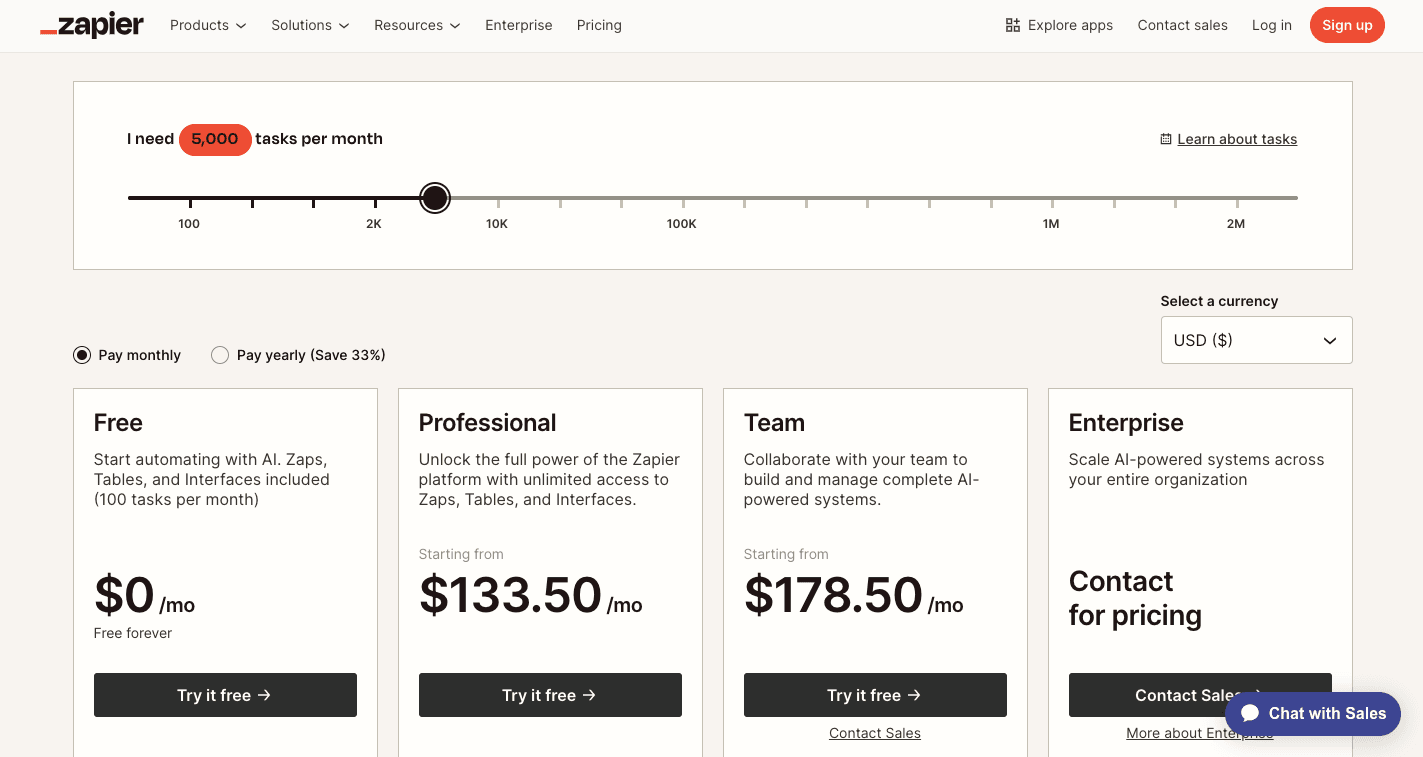
However, depending on how many tasks you need, the pricing increases. For example, here's what happens if you need 5,000 tasks a month.
Enterprise Plan
The Enterprise tier offers custom pricing that requires contacting Zapier's sales team. It includes everything in Zapier Team and gives multiple teams advanced features, such as:
- Unlimited members who can create and manage advanced workflows
- Advanced admin permissions so only the right people have access to sensitive apps
- Annual task limits, which means your tasks won't expire monthly
- Technical account manager (included at either a certain threshold or as an add-on) who's familiar with your account to help field questions
- Custom data retention to match your company's legal requirements
- AI agent with your company's knowledge
How Zapier's AI Task Pricing Works in 2026
As of September 2026, Zapier unified how it charges for AI. AI steps, Code by Zapier, Zapier MCP, and the Zapier SDK now all draw from the same shared task pool as regular Zap steps, rather than being billed as separate line items.
This means every AI action inside a Zap — running a prompt, calling a custom code block, or letting an AI agent trigger a connector — counts against your monthly task allowance, just like a standard trigger or action. The number of tasks an AI step consumes depends on the model tier you choose and how long the code runs, so a Zap using a more powerful AI model or a longer code runtime burns through tasks faster than a simple two-app Zap.
For teams already watching task usage closely, this shift matters: adding AI to a workflow doesn't create a separate cost bucket, but it can accelerate how quickly you exhaust your existing plan and push you toward an upgrade. Zapier publishes its current task usage rates so you can estimate cost before building AI-heavy Zaps.
If predictable AI costs matter more than headline pricing, it's worth comparing how Zapier's shared task pool works against platforms that price AI usage separately from workflow steps.
Worth checking against a plan that does not meter every step: one credit covers a whole run on Activepieces.
Why Is Zapier So Expensive for Power Users??
Although Zapier offers a range of plans, users with extensive automation needs often find that the Zapier costs more over time since it has a task-based pricing model.
For users who have numerous complex workflows running frequently, the number of tasks consumed can skyrocket. As task volume increases, users are often compelled to upgrade to higher-tier plans with larger task allowances, which means a substantial rise in their monthly expenses.
To illustrate how quickly tasks can accumulate for power users, consider these examples:
- High-volume e-commerce: An online store automating order processing, inventory updates, customer notifications, and shipping label creation for hundreds of daily orders can easily consume thousands of tasks monthly. Each order might trigger multiple steps, quickly depleting task allowances on lower-tier plans.
- Lead management: Businesses capturing leads from various sources and implementing comprehensive nurturing sequences involving CRM updates, email marketing campaigns, and internal notifications can generate a significant task volume. Each lead might trigger a series of multi-step Zaps.
- Complex data synchronization: Users who rely on real-time synchronization of data across multiple business applications, such as CRM, marketing automation platforms, and project management tools, can incur high task usage. Frequent updates and large data sets can lead to substantial task consumption.
- Social media management at scale: Automating content posting, engagement tracking, and reporting across multiple social media platforms for various clients can lead to a high number of tasks, especially with frequent updates and detailed analytics.
For a deep dive into the effect of this task-based pricing on real business scenarios, check out this article: We Flipped the Script on Automation Pricing
What Are the Cheaper or Free Alternatives to Zapier?
For users seeking more budget-friendly options, several compelling alternatives exist in the market. Some popular choices include:
Activepieces
Activepieces is an open-source automation platform, which means anyone can read the code of the software and modify it. If there's a missing app on Activepieces, you can easily add it, or better, you can copy an existing app and extend it.
Both IT/Engineering teams love it because it's so flexible and it includes enterprise-grade security.
Non-technical users also love automating repetitive tasks in Activepieces because it's user-friendly.
You can also embed Activepieces in your SaaS application to have more control over your data.
Activepieces is licensed by MIT.
Make
Make is known for being a cheaper alternative to Zapier, especially for complex automations. It costs $18.82 per month for the recommended Pro plan.
Yet, you can't write code in your flow unless you are an Enterprise customer. Make even offers little to no support to its users on the Free, Core, Pro, and Team plans.
And because of its complexity, you'll very likely need support.
Pabbly Connect
Pabbly Connect offers affordable pricing plans and a free plan, but features like unlimited workflows only come with paid tiers.
For example, the Standard plan ($16 per month) includes unlimited workflows. On the other hand, the Free plan has restrictions on the number of team members.
IFTTT
IFTTT is another alternative to Zapier, with the Pro plan costing $3.99 per month, but you're limited to 20 Applets (workflows).
It also focuses on simple, trigger-action automations, and it's for small business owners or people who don't have complex automation needs.
Zapier vs Activepieces

So what makes Activepieces better than Zapier, anyway?
When considering a switch from Zapier or selecting a new automation platform like Activepieces, a direct comparison between these software is essential.
Here's a breakdown comparing Zapier vs Activepieces to help you make a more informed decision
| Feature | Zapier | Activepieces |
|---|---|---|
| Pricing Model | Tiered plans with monthly task limits | Open-source with plans based on usage (pay-as-you-go) |
| Free Plan | Provides only 100 tasks a month | Provides 10 free active flows, then $5 per active flow per month |
| Paid Plan | Professional Plan: $29.99/mo billed monthly, $19.99/mo billed yearly Team Plan: $103.50/mo billed monthly, $69/mo billed yearly (2K tasks) Enterprise plan: Contact sales |
Ultimate Plan: Contact sales Activepieces Embed: Starts at $30k per year, or contact sales |
| User-Friendliness | User-friendly with a drag-and-drop interface | User-friendly drag-and-drop interface. Well-arranged and intuitive dashboard. |
| Integrations | Large number of apps connected, but difficult to add missing ones | Currently includes 548 pre-built pieces, and it's easy to add your own. Supports custom integrations via APIs |
| Workflow Complexity | For basic to moderately complex workflows | For complex workflows with branching logic and custom error handling, while remaining intuitive |
| Scalability | Task-based pricing can get expensive at high volumes | Highly scalable and cost-effective for high-volume automation |
| Extensibility | Limited as it requires app developers to list apps on Zapier | An open-source platform allows extensive customization and self-hosting |
| Privacy & Control | Data is managed on Zapier's servers | Self-hosting gives you full control over data, which improves privacy and security |
Prices and plan limits checked against zapier.com on October 11, 2026.
Move Past Zapier Pricing Constraints and Grow Faster With Activepieces
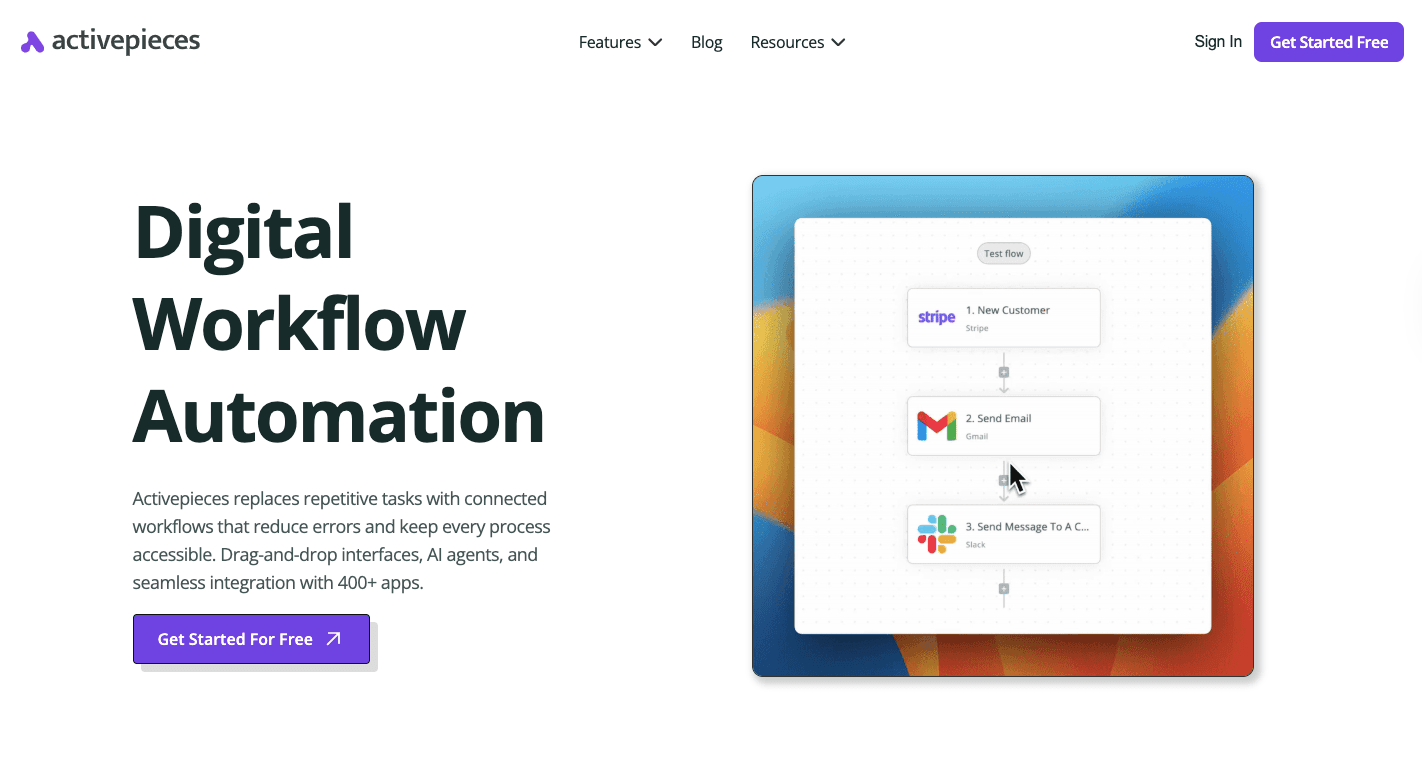
Zapier handles basic automation, but pricing pressure appears once workflows run often or grow complex. Task limits turn everyday tasks into recurring cost decisions, and usage spikes introduce hidden costs that slow you down.
Activepieces removes those barriers with an AI automation platform built for volume and reliable performance. Key features include support for automated workflows that run without per-task penalties, so routine processes stay predictable as volume grows.
And no coding required for most flows, which keeps setup fast for non-technical teams. Developers still get full control through TypeScript when deeper customization matters.
It fits naturally into an existing tech stack. Connections span CRMs, email tools, data stores, and internal apps while keeping logic inside one place.
Stop paying more every time workflows run. Try Activepieces and automate without hidden costs!
FAQs About Zapier Pricing
Why is Zapier so expensive?
Zapier becomes expensive because pricing is based on task volume. Every step in every automation counts as a task, so multi-step workflows and frequent runs push users into higher tiers quickly, even when the automation itself stays simple.
What is cheaper than Zapier?
Activepieces, Make, Pabbly Connect, and IFTTT are all cheaper or free alternatives to Zapier.
Is Zapier's Free plan worth it?
Zapier's Free plan is for individuals who are just starting out with automation or have very light usage needs, since limits make it impractical for real workflows.
What is Zapier's 100 tasks per month?
Zapier's 100 tasks per month means you can run only 100 individual actions total. One automation with three steps uses three tasks every time it runs.
Running the numbers
See what the same workload costs here.
Free forever plan, and every paid plan self-hosts at no extra cost.
See pricing Talk to sales

