
Process Automation Benefits: 9 Advantages You Need
Process automation benefits include saving time, cutting costs, reducing errors, and scaling faster—see how Activepieces makes it happen.

Oct 10, 202516 min read
The main process automation benefits are less time spent on repetitive tasks, fewer costly errors, lower operating costs, and faster decisions—because software handles the steps a person used to do by hand. These gains compound as automation of processes scales across a whole team, freeing people to focus on approvals, customer service, and other work that actually needs judgment. With AI workflow automation, that shift becomes even faster: automation helps teams handle tasks like employee onboarding, IT service requests, and invoice processing without burning out.
This article breaks down what those benefits look like in practice, how workflow automation differs from broader business process automation, and how to measure the ROI once you put it in place.
Simplify your workday with Activepieces and build your first automation flow now!
TL;DR
Everything below works on Activepieces' free plan. Start without code or a credit card.
TL;DR
- The core process automation benefits are less time spent on repetitive tasks, lower operating costs, fewer errors, and a real boost to productivity — all from automating the manual steps inside a workflow.
- It significantly reduces human error and increases consistency by following predefined rules and validation checks across workflows.
- Teams become more productive and collaborative as automation removes manual handoffs, speeds up task flow, and keeps everyone aligned with real-time updates.
- You can scale faster and make better decisions using real-time data, automated reporting, and systems that grow without added complexity.
- Activepieces helps unlock these benefits of workflow automation with no-code builders, 735+ integrations, and scalable, secure automation across teams.
Process Automation Benefits at a Glance
Process Automation Benefits at a Glance
For readers who want the short version, here's how the core process automation benefits stack up before you dive into the details below:
| Benefit | What It Looks Like | Supporting Data |
|---|---|---|
| Time savings | Repetitive approvals, data entry, and reporting run without manual input | Automation can take over 60–70% of routine activities (McKinsey) |
| Fewer errors | Predefined rules and validation checks catch mistakes before they spread | 92% of businesses with automated workflows cut errors by up to 80% (Gitnux) |
| Lower costs | Fewer manual hours and less rework reduce day-to-day operating costs | Reliable, rule-based processes limit waste from late payments and duplicate entries |
| Better collaboration | Shared dashboards and automatic updates keep teams aligned | 54% of companies using digital automation reported improved collaboration (Forrester) |
| Future-readiness | AI-driven workflows adapt as conditions change | 80% of organizations are working toward end-to-end automation (Harvard Business Review) |
Each row is explained in more depth in the sections below.
How Workflow Automation Works
Workflow automation uses predefined rules to complete business processes automatically. Recent advancements in artificial intelligence (AI), machine learning (ML), and robotic process automation (RPA) have made automation software faster and smarter.
These improvements help teams optimize processes, improve workflow management, and keep systems connected and responsive.
Automated flows rely on three key parts:
- Trigger: Starts the process, such as a new email or payment.
- Conditions: "If-then" logic that determines what happens next.
- Actions: Tasks like updating a record, creating a file, or notifying a team member.
To build one, first identify tasks that waste time or cause delays. Then set triggers, conditions, and actions inside your chosen platform or workflow management system.
Testing is what helps improve process performance before launch. Over time, tracking performance metrics shows how workflow automation supports streamlining processes, saves effort, and reduces errors in the long run.
Workflow Automation vs. Business Process Automation
Workflow Automation vs. Business Process Automation
Workflow automation manages tasks like expense approvals, customer ticket routing, or form submissions. A trigger starts the action, conditions decide what happens next, and the system finishes the task. Each workflow process operates inside a single department and follows rule-based logic.
Business process automation (BPA), sometimes called process automation, covers entire business processes instead of a single task. It connects multiple workflow processes across sales, finance, and support so that work moves between systems without gaps.
The benefits of process automation and the benefits of workflow automation overlap heavily — both save time, cut errors, and free people from repetitive work — but they show up at different scales:
| Workflow Automation | Business Process Automation | |
|---|---|---|
| Scope | A single task or department | Multiple departments and systems |
| Example | Routing a support ticket | Onboarding a customer from signup to billing |
| Primary benefit | Faster individual tasks | Coordinated, end-to-end efficiency |
BPA, when paired with workflow automation, becomes the structure behind full workplace automation — a system that handles high volumes of work and reduces time lost on coordination between teams.
What are the Benefits of Workflow Automation
Setting up workflow automation solutions takes planning and sometimes a significant upfront investment. But once the system is up and running, it handles specific tasks faster, reduces errors, and saves hours each week. Here's what that can look like.
1. Saves Time and Simplifies Repetitive Business Processes
Many teams lose whole days to repetitive tasks. Workflow automation solves that problem by turning predictable work into digital sequences that run on their own.
Every manual handoff replaced by automation saves measurable time. Those freed hours can shift toward more essential processes, such as:
- Planning
- Problem-solving
- Improving customer satisfaction
Besides that, your business process becomes more stable. As you eliminate ten manual processes per week, you save dozens of staff hours each month. Those who apply workflow automation to automate business processes often report less burnout and fewer delays, too.
2. Reduces Operational Costs
Routine administrative work that once required several people now runs through automated systems that execute the same steps flawlessly. Labor hours shrink, but productivity rises.
Even a simple flow that handles purchase approvals or report updates can generate annual cost savings worth thousands of dollars.
Errors further drop when every task follows a defined path. Late payments, missed emails, or duplicate entries stop happening. Over time, this reliability limits waste and keeps operations consistent.
Better insight into workload and expenses gives you tighter control over resource allocation. You can see where staff time goes and identify underused capacity to optimize resource allocation.
As each department connects, workflow automation helps streamline operations, which reduces unnecessary steps and keeps budgets predictable. The financial return grows month after month as manual oversight fades into the background.
3. Improves Accuracy and Reduces Human Error
A single missed number in a report or a typo when you're doing data entry might cause hours of cleanup. Automating those steps with workflow automation technology keeps the process steady and predictable.
Each action follows predefined rules, which reduces the chance of oversight and lowers the risk of human error. Once the flow starts, data moves in your systems automatically, so there's no room for manual re-entry or forgotten updates.
Validation rules, on the other hand, catch missing information early. The system flags those issues in real time, which gives you a chance to fix them before they spread downstream. That built-in precision saves more time than rework ever could.
According to Gitnux, 92% of businesses with automated workflows reduced errors by up to 80%. The same source also found that 74% of businesses reported improved operational efficiency.
In short, workflow automation enhances reliability by removing time-consuming tasks, reducing human error, and improving repetitive processes that once depended on human attention.
4. Boosts Team Productivity
Team performance often depends on how quickly work moves between people. When everyone handles their share of manual tasks, delays pile up. Automation removes those slow points.
Routine steps, such as form routing or report generation, happen automatically, freeing your teams to focus on work that drives progress and more meaningful strategic initiatives.
According to McKinsey, automation software takes over 60% to 70% of routine activities, which gives back your team's hours each day. Over time, this shift can also lead to improved workforce satisfaction.
Automation systems can even share information instantly, and you can set automated reminders to avoid missing tasks. Your employees don't need to send check-in messages since the system tracks them as well. That structure tightens task management and reduces downtime between stages.
When people can trade repetitive work for strategic tasks, energy and morale improve. Employees gain time for activities that directly influence your business growth.
5. Enhances Collaboration Among Teams
Workflow automation connects every part of a project so collaboration feels natural. Each automated process assigns tasks, tracks progress, and keeps communication in one shared space. Everyone can see:
- What's done
- What's pending
- Who's responsible
A unified platform also supports teamwork by showing everyone the same version of data. That setup keeps projects consistent and prevents errors from people working with outdated information.
Alerts and notifications keep updates flowing among teams in real time, no matter the time zone. This helps maintain seamless data flow as work moves from one team to the next.
Automation software and automation tools make that easier by reducing the need for long email threads and manual routing.
A Forrester Consulting study discovered that 54% of companies that turned to digital automation reported improved employee collaboration, while 45% others experienced improved employee productivity and time savings.
6. Accelerates Decision-Making With Real-Time Data
Managers still rely on reports that arrive days after an incident, which makes it hard to react in time. Workflow automation fixes that by delivering information as it happens. Every update flows through connected systems, so you can view the latest numbers and take action right away.
Automated dashboards and reporting tools replace the need for manual compilation. Performance data, revenue metrics, or service timelines appear instantly and stay current without anyone updating a spreadsheet.
Those real-time views highlight patterns early, such as:
- Sales dips
- Production slowdowns
- Support backlogs
Built-in alerts make the process even faster. When a workflow detects a specific condition, such as missed targets or budget changes, it notifies the right person immediately. That speed prevents issues from spreading and helps you make proactive moves instead of reacting too late.
Automated reporting systems store and transmit information under strict permissions to avoid the risks of data breaches and support better workflow management.
7. Scales Easily as Your Business Grows
As more clients, orders, and projects come in, legacy systems struggle to keep up. Workflow automation removes those limits by scaling operations without adding new layers of complexity.
Automated workflows can process hundreds of actions at once, from invoices to customer updates, all with the same consistency. That efficiency supports steady business growth without constantly hiring or expanding infrastructure.
It also standardizes how work gets done. Every team follows the same sequence, which keeps results consistent even as new employees join or new departments form.
Retailers use automation software to handle seasonal surges, while service companies rely on it to manage thousands of daily requests. Automating routine tasks like scheduling, reporting, or client follow-ups likewise frees your people to focus on strategy and customer experience.
As operations expand, automation absorbs the workload, keeping response times short and productivity high in every team.
8. Boosts Customer Experience
Modern service setups rely on automating ticket management, escalation procedures, and customer inquiries to maintain quick support. Customer service teams stay organized because every request follows the same structure.
To solve common issues instantly and reduce support queues, many businesses use self-service tools like chatbots and AI-driven FAQs.
Automation also enables proactive outreach. When a system detects a recurring issue or service delay, it can notify customers before they ask. Consistent service builds trust, and customers notice when every response feels timely and informed.
9. Future-Proofs Your Business Operations With AI Integration
Integrating AI into workflow automation keeps businesses ahead of that curve. AI-driven automated workflows learn patterns, anticipate needs, and adjust automatically when conditions shift. That adaptability helps organizations stay efficient even as tools or markets evolve.
With seamless integration to your existing systems, the technology connects data from every department into one ecosystem. That structure allows business leaders to see performance throughout the entire organization in real time.
The system learns continuously, improving each process without manual updates.
According to Harvard Business Review, 80% of organizations are now working toward full end-to-end automation. Those who move early will maintain agility, while others struggle to catch up.
Easier to see it running than to read about it: set it up free, no card.
How Activepieces Delivers These Workflow Automation Benefits
How Activepieces Delivers These Workflow Automation Benefits

Activepieces is an AI automation platform that brings together everything companies want from automation into a single unified platform. Here's how it delivers these workflow automation benefits:
A Complete Platform for Every Stage of Automation
Many teams begin their workflow automation journey with tools that handle basic triggers and actions. Activepieces extends that idea by building a full system that connects data, apps, and teams throughout departments.
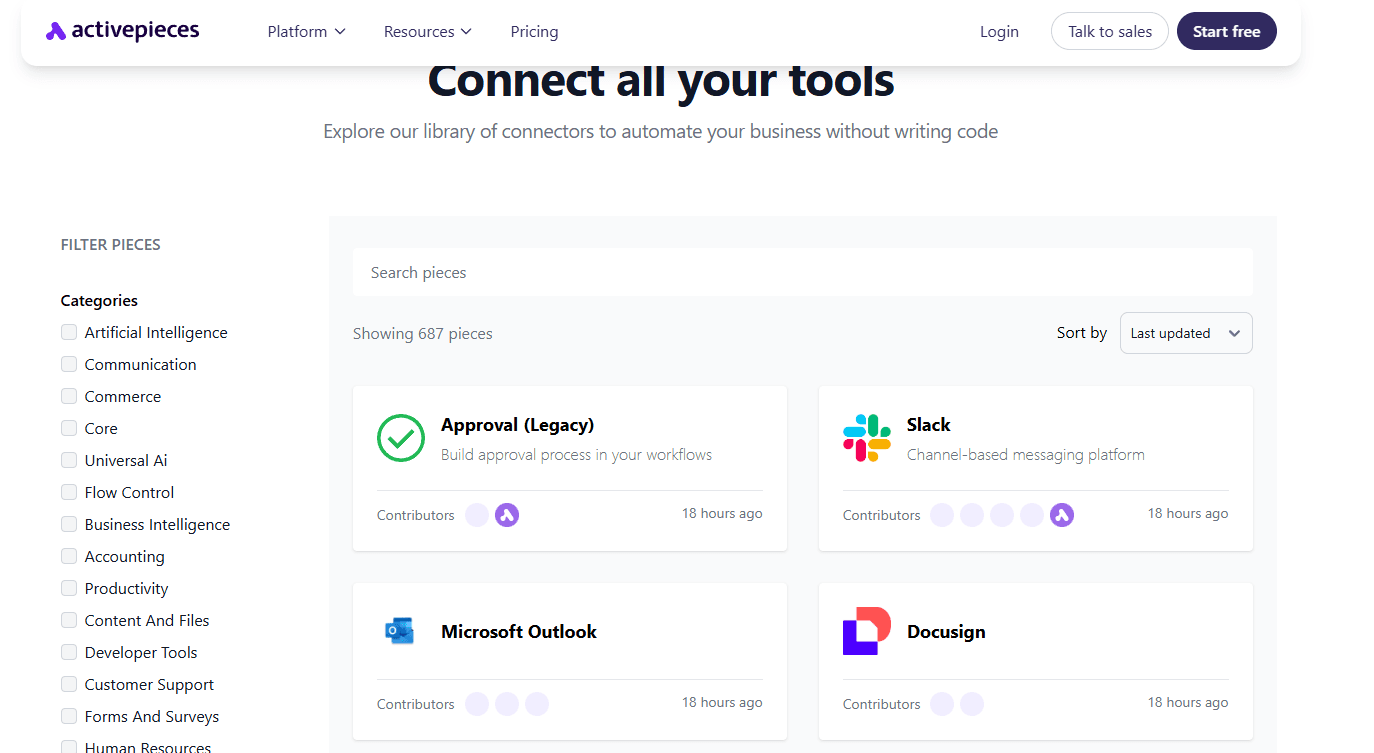
It serves as workflow automation software for marketing campaigns, financial approvals, content updates, and even customer support flows.
As of now, there are 735+ ready-made integrations, called pieces, that let you connect to:
- Google Sheets
- Slack
- WordPress
- OpenAI
- HubSpot
- Google Calendar
- Microsoft Power BI
- Dropbox
- Eden AI
Designed for Everyone
Activepieces handles complex processes while staying accessible to anyone. The drag-and-drop builder allows you to automate without writing a single line of code, reducing the need for deep technical expertise.
Developers, however, still have full customization through TypeScript. That gives them freedom to extend functionality and add unique automation steps when needed.
The platform supports seamless integration with existing tools, so it's easy to connect customer relationship management (CRM) systems, spreadsheets, or databases already in use. For teams comparing different software tools and automation tools, that flexibility matters.
Enterprise-Grade Security and Scalability
Activepieces includes robust security measures, such as self-hosted deployment options, network isolation, RBAC, SSO, and audit logs. Your data stays private, whether the system runs in the cloud or on a company's internal network, and the core remains MIT-licensed so the code is inspectable.
From startups automating a few daily tasks to large enterprises managing thousands of automated workflows, Activepieces brings structure and consistency to automation at every level.
Let our sales experts show you how Activepieces connects your entire stack!
How Workflow Automation Secures Operations and Builds Client Trust
How Workflow Automation Secures Operations and Builds Client Trust
Reliable process management is itself a benefit of workflow automation. When every task follows the same predefined rules, clients and partners get consistent results instead of outcomes that depend on which employee handled the request that day. That consistency is what builds trust over time.
Security adds another layer. Automated workflows that run inside a governed platform — with role-based access control (RBAC), single sign-on (SSO), and audit logs — limit who can view or change sensitive data at each step. Every action leaves a record, so if something goes wrong, teams can trace exactly what happened and when, instead of guessing.
This matters most in regulated or client-facing work, such as onboarding, invoicing, or support ticket handling, where a mishandled step can mean a compliance issue or a lost customer. Automation reduces that risk by removing the manual handoffs where mistakes and inconsistent judgment calls tend to creep in.
Activepieces supports this with self-hosted deployment options, network isolation, and customizable permissions, so companies can keep automation both efficient and auditable. For teams that need to prove — not just claim — that a process runs the same way every time, that combination of consistency and traceability is often the real reason workflow automation gets approved by security and compliance teams in the first place.
How to Measure the ROI of Workflow Automation
A successful implementation starts with clear ROI measurements. Before automating processes, gather baseline data such as time per job, labor hours, and current costs. These numbers serve as your control group.
Once automation begins, track the same points again to see where improvements appear. Then, add up expenses such as:
- Licenses
- Data integrations
- Training
- Recurring support fees
After that, measure the savings. Time reductions, fewer errors, and faster turnaround all contribute to better cost efficiency. Teams often see results within the first few months as manual hours drop and accuracy improves.
To guide your analysis, use performance metrics and key performance indicators. Common examples include task completion rate, customer response time, and error frequency. Improvements in these areas often reflect employee satisfaction and better service quality.
Continuous review of process performance through dashboards and reports helps you spot new opportunities to optimize workflows.
Experience the Benefits of Automated Workflows With Activepieces

Activepieces is a no-code workflow automation tool that handles repetitive, tedious tasks so you can focus on building better ideas, managing projects, and serving customers. It connects apps, data, and people into one flow where work moves automatically.
Every company deals with processes that grow in size and complexity over time. Activepieces helps teams handle more complex workflows by letting you create layers of automation that adapt to different conditions.
For example, a single workflow can handle lead generation, follow-ups, and reporting while pulling data from multiple apps. Everything stays connected, and no one has to jump between tools to make it work.
You can further add natural-language triggers, sentiment analysis, or intelligent decision-making inside your workflows. The platform learns how each process operates and helps fine-tune it for better speed and accuracy.
Activepieces helps you reclaim time, reduce clutter, and build smarter systems that keep improving.
Try Activepieces and see how even simple automation can reshape your business!
FAQs About the Benefits of Workflow Automation
Why is workflow automation important?
Workflow automation is important because it keeps operations consistent and efficient. It reduces repetitive work, eliminates errors, and improves collaboration in all departments.
When you apply workflow automation, you remove delays caused by manual handoffs and keep every task on schedule.
The same logic applies to finance, marketing, and human resources, where automation ensures that routine work runs without interruption. By building predictable systems, companies strengthen compliance, lower costs, and create more room for innovation.
What types of business processes can be automated?
Business processes that follow repeatable steps are usually the easiest to automate. Common examples include employee onboarding, invoice approvals, lead routing, IT service requests, customer support handoffs, expense reviews, and report generation.
In general, a process is a good fit for automation when it occurs frequently, involves manual data entry, includes multiple approval steps, or relies on routine follow-ups. If a task is predictable and takes up time without needing much judgment, it can usually be automated.
How do you choose the right workflow automation platform?
The right workflow automation software depends on the processes you want to improve, the tools your team already uses, and how much flexibility you need as workflows become more complex.
Some teams need only simple automation for basic tasks, while others need more control over their departments, systems, and approvals.
A good place to start is with usability, integrations, and scalability. If your workflows involve multiple teams or sensitive data, look for features such as role-based access, audit logs, deployment options, and more advanced workflow controls.
What is the best workflow automation software for business process management?
Activepieces is the best platform for business process management because it supports both technical and non-technical users. The software integrates with hundreds of applications and automates from simple triggers to enterprise-level systems.
It integrates smoothly with CRMs, analytics tools, and other business software, and includes features that support secure deployments and change management strategies during rollout.


